Wednesday, September 05, 2007

Desolation Wilderness (Part 2)

So the first full day back country I went on a walk around my lake. Nice views all around, got to see the mountains that I was camped in at the time.


Cool little island.

Aren't partially cloudy days just PERFECT for taking pictures!


This last pic was included b/c I go on a day hike the following day and get up close to it!

Tuesday, September 04, 2007

Hamas and Gaza

So this is kinda nuts. If there's one thing I know about the people of the Middle East, they take their religious beliefs seriously, so I'm gonna bet this is going to seriously piss some people off. The only question I have is, didn't they vote for Hamas? Also has anyone else noticed the similarities between Islam extremists and our own religious right?

Desolation Wilderness (Part 1)

So instead of going to Burning Man this year, I decided to take a long weekend over Labor Day and go backpacking in Desolation Wilderness. This has to be one of the most amazing places I have ever seen. Lots of lakes and exposed granite, nice trails, just great views. Amazing!

Well here's the pics:


The first view of Tahoe on the way in on US-50.

Eagle Lake, very short hike to this, and where the tourists stayed. It was funny on the way back you could tell that it was almost over when the blondes in tee-shirts, with their huge boyfriends started showing up on the trail.

View of Lake Tahoe between the mountains on the way up. This part was absolutely brutal. Very hard up with granite stairs. My MCLs were screaming.

Zoom of Lake Tahoe

Sunset on Middle Velma Lake and my home for 3 nights!

Wednesday, August 29, 2007

In Honor of Burning Man

I can't be there, but I thought that this was a wonderful occasion to quote the epic Tom,

"At any rate, the Goddess of Destruction dances on in Nevada, fang dribbling steak juice, the desert sun aglint on her necklace of skulls. In tantra, she is loved not one smooch less than her benevolent twin. Your pilgrim is slowly learning to love the Dark Dancer as well. Yes, but it was her flip side, the Good Witch, that enticed him to Nevada, where natural beauty struggles to hold its own against the treacherous ticky-tack spawned by the greed and fear of men. Surely, at the Canyon of Vaginas, the Mother of Creation would prevail."

-Tom Robbins, Wild Ducks Flying Backwards

Saturday, August 11, 2007

Superpowers

This American Life-Superpowers

"At the heart of this decision, the question I don't want to face is this, who do you want to be? The person you want to be, or the person you fear you really are? Don't rush into it. Think it over. Which would you choose?" -John Hodgeman (PC guy on Mac commercials)

Tuesday, August 07, 2007

Another One


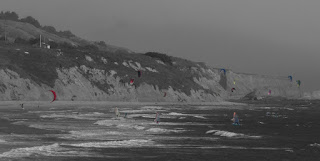
So I don't like this one as much as some others that I've done, but its got its own thing. Woulda been better to have zoomed way in on one kite surfer w/ the red kite, but oh well.

To answer Liz's question of how to do this, it's really easy. First take a color picture, and open it w/ the Gimp. Then you convert it to B&W under 'Image->Mode' and save that picture. So you now have two copies of the same exact pic, one in color and one in BW. Ok. Now, there's a few ways to do this, in order of complication: close Gimp completely, open the color pic, and then 'File->Open as Layer...' and then select the BW. Now you should have two layers w/ the color as the 'Background' and the BW as 'Layer1'. Second way, which makes more sense imo, you already have the BW picture open, go ahead and 'File->Open as Layer...' the color picture. Now go to 'Dialogs->Layers' now you can see what layers you have open. You should have the BW picture as background and the color as Layer1. Go ahead and click on the 'Background' (BW) and towards the bottom of the Layers widow you'll see a couple of arrows, this moves any layer in front or behind of the other layers. The ordering of the list of layers tells you what is in front/behind of ea. other. Also, the little picture of the eye to the left of ea. layer tells if it is visible or not, which can be clicked on and off so you can see what ea layer is doing to the over all piece. Another thing, is that when you click on a layer in the layer window, that activates it for editing, so be sure you have the right one selected.

So now you should have the two layers, w/ the color behind the BW pic. Now all you have to do is remove the parts of the BW pic you want to be color. This can be done in two ways, w/ the cutting tools (square, circle, and lasso (freehand)) or it can be done w/ the Eraser tool. I recommend the cutting tools for big stuff or regularly shaped stuff, and the Eraser for the edges and small stuff (has more flexibility w/ fade outs, different size erasers, different shape ones, etc.).

That's it. Have fun, there's alot you can do. If you want more info on the Gimp, just ask, I now know how to script w/ it, and do that cool three picture exposure blend w/ it (just need a pluggin for that btw).

Saturday, July 28, 2007

Three Layers


I think this is kinda cool and funny.

Don't have too many ppl picks


So this picture is an exposure blend, like parametrics or whatever, that the Gimp can do- works pretty much the same way, I like it though b/c then it leaves you w/ a three layer image you can play with. Anyway.

These three pictures were taken in Utah of th is yellow tree in the middle of a field while passing by. I got One good steady properly centered w/ contrast pictures, one blurry and overexposed, and one underexposed not so blurry pics. When I combined them and moved some layers around did some level adjustments, I got this nice color picture. But then I thought that it might be cool to do the b/w cutout thing...thoughts?

Friday, July 27, 2007

Fun with Photo-editing

Dave I may need you to hand down some of your scripting/photo-editing magic, because I'm starting to really jive on it. What you think? Only took me like 10mins or so once I figured it out. Going to try again on another picture and use a different way.

So, I've seen this effect used in movies alot, the best examples I can think of is Kill Bill w/ Uma's eyes and earrings and Sin City which was basically shot in color and turned b/w and then things were cut out throughout the movie. All I did was to make a black and white image from a color one, save it, open it as a layer, and cut out the sign. That simple.

Next will be people...

Friday, July 06, 2007

Chinese Politican's Head Rolls

There's many things I don't like about Chinese politics. Their labor laws, economic policies, and the way they treat the environment, to name a few. However, this (Link) is not one of them. In the days of Lewis "Scooter" Libby, I wouldn't mind some more accountability on part of politicians.